
OpenClaw Architecture - Part 5: Tools, Plugins, and Capability Boundaries
Why tools are where chat becomes action… and why it’s really just capability design

A wrong answer in chat is usually cheap.
A click in your logged-in browser is not.
Neither is an exec on the host. Neither is a sessions_send into another thread.
That is the line that matters.
In OpenClaw, tools are where chat stops being chat and starts becoming action. Once a model can call tools, the question is no longer just what it says. It is what the system will do on its behalf.
A model produces text. A tool produces reality.
Tools are where the system starts spending authority
OpenClaw’s agent loop is the path from input to action: context assembly, model inference, tool execution, streaming replies, and persistence.
That is useful to keep in view because it separates two different concerns.
A session lane keeps one session from having two active writers at once. The global queue caps concurrency across sessions. Those are good invariants. They keep the Runtime / Data plane orderly.
They do not decide whether the Runtime is allowed to touch a signed-in browser, a gateway host, or a paired node.
That is a different boundary.
Tool execution also stays inside that same serialized run.
Tool events and assistant deltas stream separately. Tool results can be persisted into the session transcript. And those results can re-enter the loop before the final reply is produced.
That is the important picture.
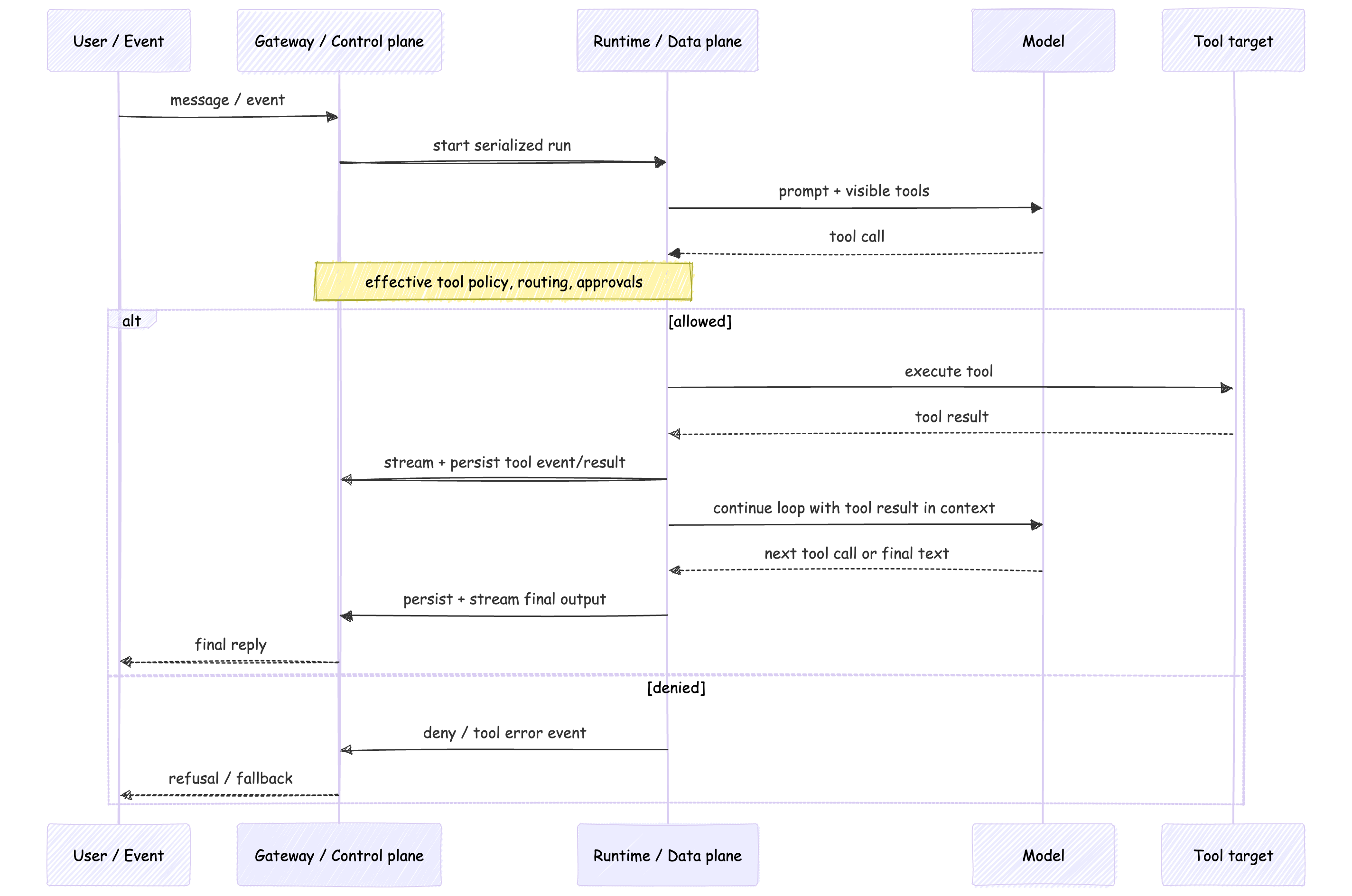
This is why tools change the architecture.
The model is still generating text. But the system is now spending authority.
The prompt is not the boundary
OpenClaw is very clear about this.
Prompt guardrails are advisory. They shape behavior. They are not the thing enforcing policy.
The real enforcement lives elsewhere: tool policy, approvals, sandboxing, and channel controls.
That matters because it gives you a cleaner mental model.
The model boundary is what the model can see: prompt text and tool schema.
The capability boundary is what the system will actually do.
OpenClaw’s tool system makes that visible. You can start from a profile like minimal, coding, messaging, or full, then narrow further with tools.allow and tools.deny. Deny wins. Disallowed tools are not sent to model providers.
So capability design starts before execution starts.
The session and security model makes the other half of the point.
The Gateway is the source of truth for session state. A sessionKey is for routing and context isolation. It is not a per-user authorization token. That means per-user session or Memory isolation can help with privacy and state ownership without creating per-user host authorization.
If several people can message one tool-enabled agent, they are still steering one delegated capability surface.
A session key isolates context. It does not isolate power.
A lot of “the model did something weird” stories are really capability-boundary stories in disguise.
Same tool, different consequence
This is where labels hide the real story.
“We enabled the browser tool” sounds like one decision.
In OpenClaw, it isn’t.
The built-in browser profiles are openclaw, user, and chrome-relay.
openclaw is the managed, isolated browser.
user is the built-in Chrome MCP attach profile for an existing signed-in Chrome session.
chrome-relay is the explicit extension-relay mode.
Those are not cosmetic differences. They are different capability paths with different inherited state and different consequences.
The same is true for exec.
host=sandbox, host=gateway, and host=node are not small implementation details. They are different execution targets. The tool may look the same in the prompt. The consequence does not.
Session tools belong in the same conversation. sessions_list, sessions_history, sessions_send, and sessions_spawn are not housekeeping. They are routing power. Their visibility can be self, tree, agent, or all.
Nodes widen the surface again. A companion device can expose command families like canvas.*, camera.*, device.*, notifications.*, and system.*. That is still the same agent loop. It is just reaching farther.
My read is that browser, exec, session tools, and nodes are capability tiers, not a flat tool list.
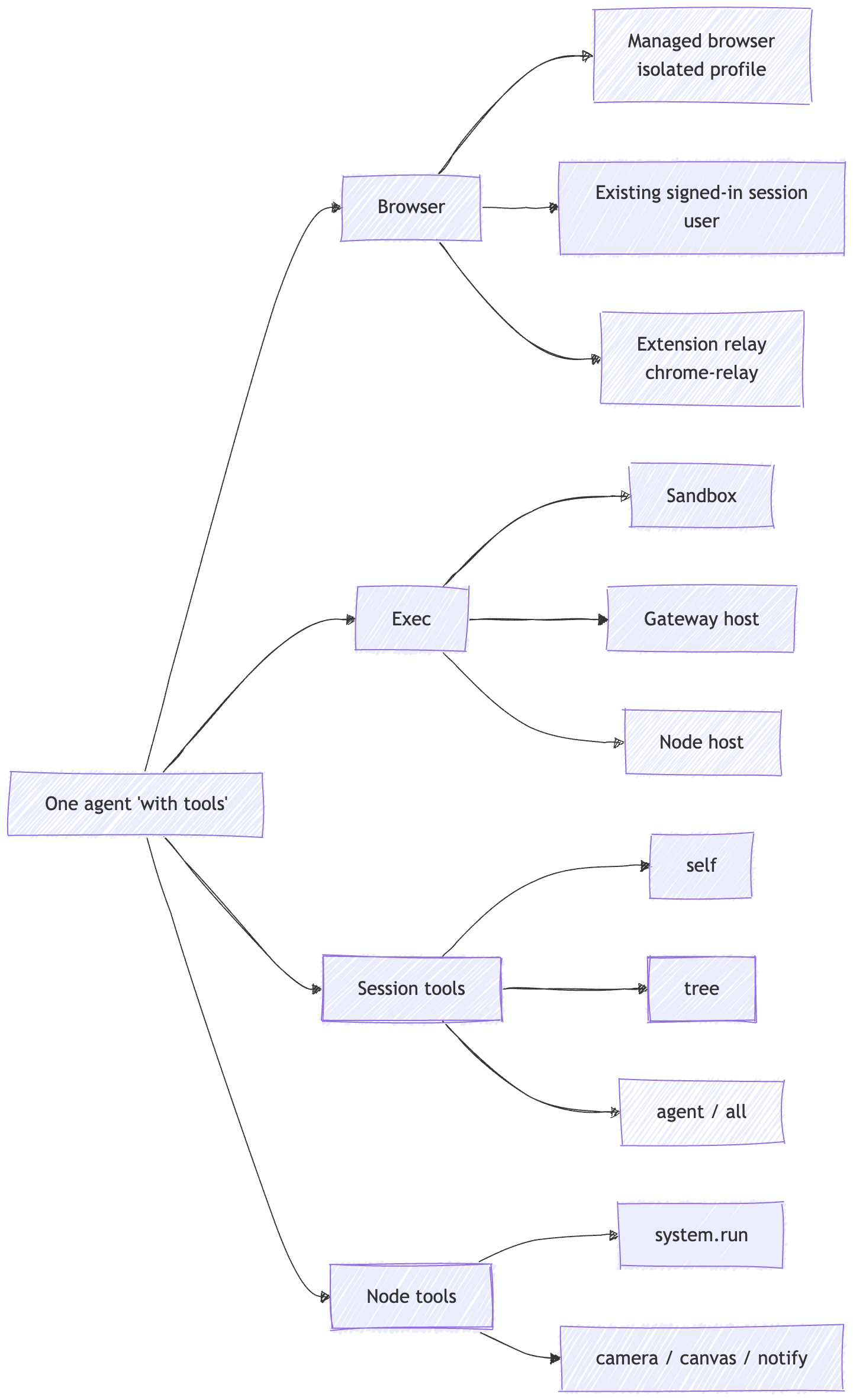
Same label. Different authority.
Plugins widen the Gateway
A plugin sounds optional.
Architecturally, it usually isn’t.
OpenClaw splits plugins into two pieces.
The manifest handles discovery and validation.
The runtime module registers the behavior that actually changes the system.
That is a useful distinction. It is less about “control plane vs data plane” in a strict sense, and more about discovery and validation first, runtime capability registration second.
Once loaded, the trust model becomes much simpler.
Plugins run in-process with the Gateway. They are not sandboxed. OpenClaw tells you to treat them as trusted code. And the plugin surface is broad: tools, hooks, HTTP routes, Gateway methods, commands, services, context engines, skills, auto-reply commands.
That is why “plugin” is almost too small a word.
Plugins do not just add features. They extend trust.
My read is that an OpenClaw plugin is better understood as trusted Gateway code.
That does not mean the design is reckless. It means the trade-off is explicit.
The docs push operators toward explicit allowlists, careful review, and source trust. That is the right level to reason about it. Installation and enablement are trust-sensitive operations.
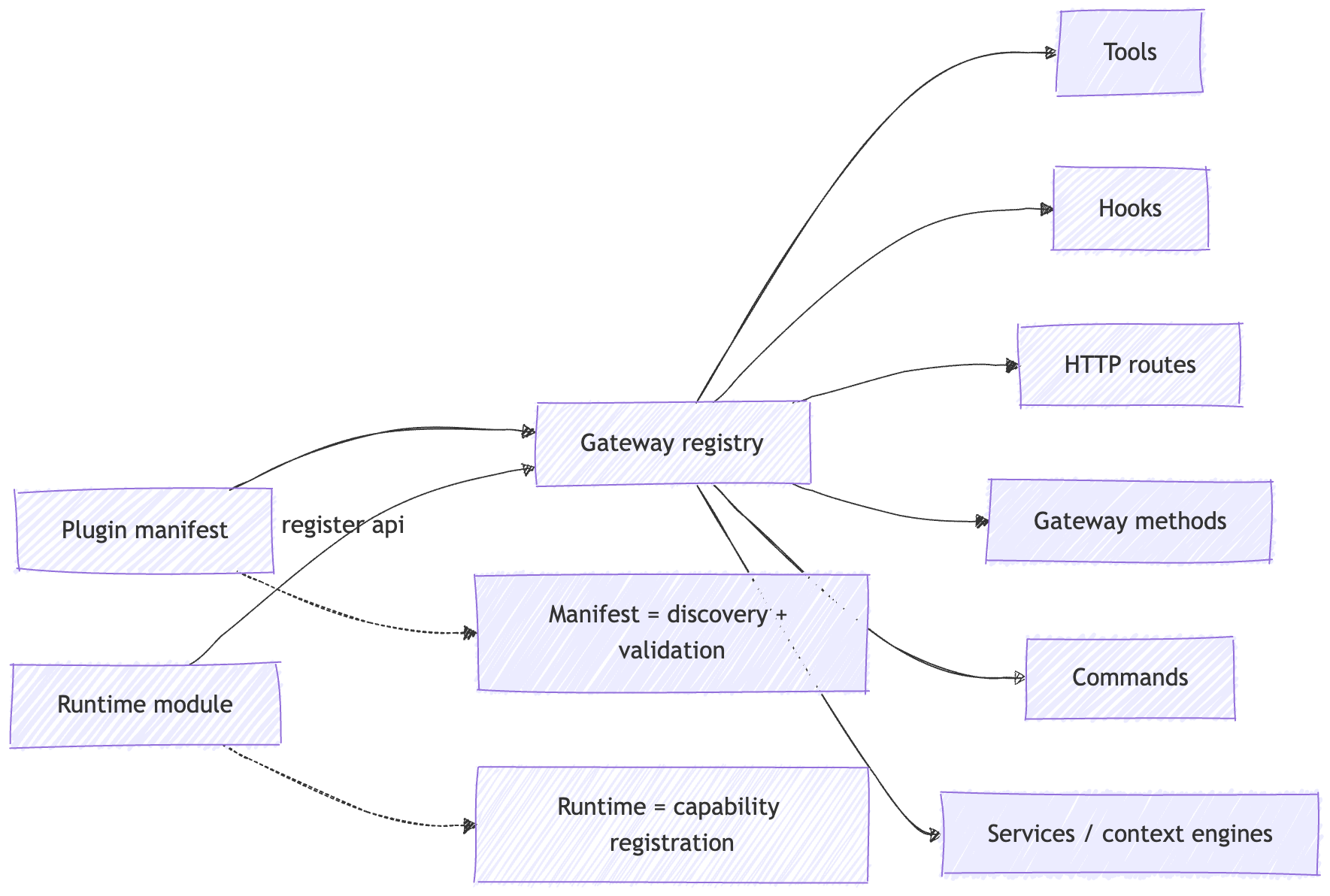
A plugin is not just a feature add-on.
It is a decision about what code now lives inside the control plane.
What the operator is really deciding
Once you see the system this way, the questions get simpler.
Who can talk to it.
Where can it act.
What can it touch.
What code did I load into the Gateway.
That frame is more useful than a generic checklist because it maps directly to the architecture.
Who can talk to it is pairing, allowlists, group policy, and whether multiple people are steering one shared tool surface.
Where it can act is managed browser versus attached browser, sandbox versus gateway host versus node host, and whether host-side execution is available at all.
What it can touch is tool profiles, deny rules, session visibility, node permissions, and whether broad control-plane surfaces are exposed in the first place.
What code you loaded is plugins, skills, route handlers, and command handlers.
That is extension trust, not prompt design.
Approvals matter, but they are interlocks, not absolution.
They are useful because they slow down real-world action at the edge where it matters. They still do not turn a broad capability surface into a narrow one.
My read is that auditability belongs here, at the control-plane edge where tool exposure, approvals, routing, and lifecycle events are visible, not in whatever story the model tells after the fact.
Failure modes
1) Shared room, shared authority
You isolate sessions per user. You keep Memory separate. You still end up with one shared permission surface because multiple people can steer the same tool-enabled agent.
Session ownership and authorization are not the same thing.
2) Same tool label, bigger consequence
“Browser enabled” sounds manageable until the Runtime is attached to a real signed-in browser.
“Exec enabled” sounds manageable until it moved from sandbox to gateway host or node host.
Same label. Bigger consequence.
3) Plugin becomes a second ingress path
A plugin can register an HTTP route, a Gateway method, or an auto-reply command that runs without invoking the AI agent.
At that point you did not just add a tool. You added another way into the control plane.
4) Cross-session tools quietly widen scope
If session visibility is broader than you thought, the agent can browse or steer more than the current thread.
That is not necessarily a bug.
It is a scope decision.
5) Plugin identity is mistaken for provenance
plugins.allow is useful.
But id-based trust is not the same thing as provenance-based trust. If you forget that, you can end up trusting a name more than the code behind it.
Builder checklist
If you are building or operating one of these, this is the short list I would keep nearby.
Start with the smallest tool profile that still works.
Treat
sessionKeyand Memory isolation as routing and privacy boundaries, not authorization.Choose execution targets explicitly: managed browser, attached browser, sandbox, gateway host, or node host.
Keep broad control surfaces off untrusted inputs unless you really mean it.
Treat plugins and skills as trusted Gateway code.
Use approvals as interlocks, not substitutes for scoping.
Put lifecycle events, hooks, and logs around capability use.
Recap
Part 1 explained why OpenClaw feels alive: more inputs, durable state, and a loop.
Part 5 is the next step.
A loop becomes consequential when it gains tools.
Once that happens, the important question is no longer just “what did the model say?”
It becomes:
what was exposed?
where did it execute?
what trust boundary did it cross?
what will still be true after the run is over?
That is the systems view of tools.
Part 6
Part 6 is where this becomes operational.
If Part 5 is about where action enters the system, Part 6 is about how you prove what happened after the system acted: observability, recovery, evaluation, containment, and the boring guarantees that keep production systems survivable.
Start here: OpenClaw Architecture Series


References / further reading
This post leans primarily on OpenClaw’s official docs. I used them for the core claims about prompt construction, tool exposure, session ownership, execution targets, approvals, plugin trust, and transcript lifecycle.
OpenClaw system prompt + tools docs - How tool exposure happens before execution.
OpenClaw agent loop + session management docs - Serialized runs, tool-result flow, and Gateway-owned session state.
OpenClaw security docs - Prompt guidance vs real enforcement, delegated authority, and browser risk.
OpenClaw browser, exec, session tools, and nodes docs - Capability tiers across browser, execution, session scope, and device control.
OpenClaw plugins + plugin manifest docs - Plugin trust, validation, allowlists, and extension surfaces.