
OpenClaw Architecture - Part 1: Control Plane, Sessions, and the Event Loop
Why it feels “alive”… and why it’s really just inputs + state + a loop

Most AI agent demos feel magical.
OpenClaw feels autonomous.
But under the hood, it’s not magic - it’s a disciplined event-driven system.
OpenClaw is a self-hosted, open-source personal AI assistant that lives closer to your operating system than a typical chat app. Instead of chatting inside a browser tab, it connects to the messaging channels you already use (WhatsApp, Telegram, Slack, Discord, iMessage, WebChat, and more) and can execute real actions through tools.
A lot of people describe OpenClaw as “autonomous” or “always on.” The easiest way to demystify it is:
OpenClaw doesn’t become proactive because it “wakes up and thinks.” It feels proactive because it has more kinds of inputs than just your messages, and it processes them in a consistent loop.
That’s the elegant architectural secret.
1) What OpenClaw is (and what it isn’t)
What it is:
A Gateway (control plane) that receives events from many places and routes them.
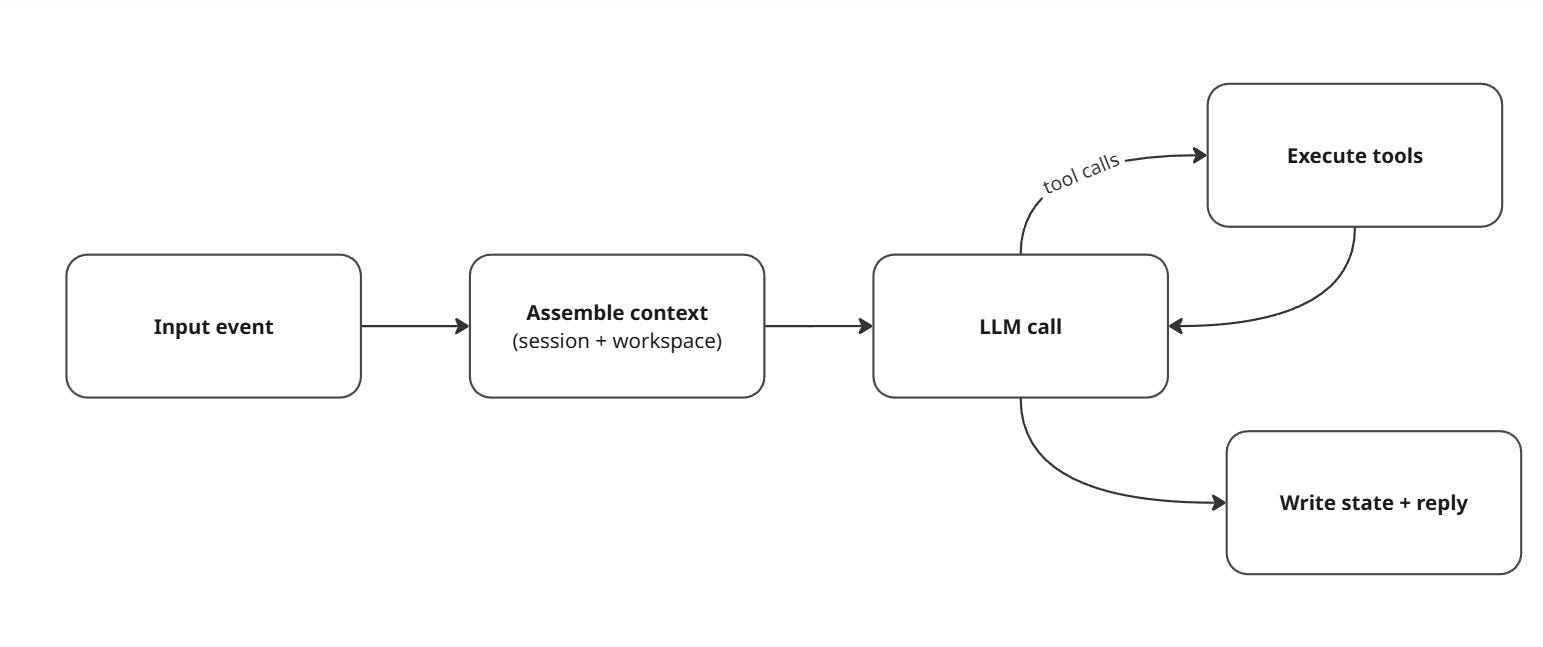
An agent runtime that takes a “turn,” calls an LLM, uses tools, writes state, and replies.
OpenClaw’s own docs describe the Gateway WebSocket protocol as the single control plane that all clients connect to (CLI, web UI, macOS app, iOS/Android nodes, etc.).
What it isn’t:
A sentient system.
A continuously reasoning brain running in the background.
If it looks like it “had an idea at 3:00 AM,” it’s usually because a timer, schedule, webhook, or hook created an event at 3:00 AM, and the agent ran a normal turn.
2) The big picture: hub-and-spoke, with the Gateway at the center
If you’re visual, here’s the whole architecture in one diagram:
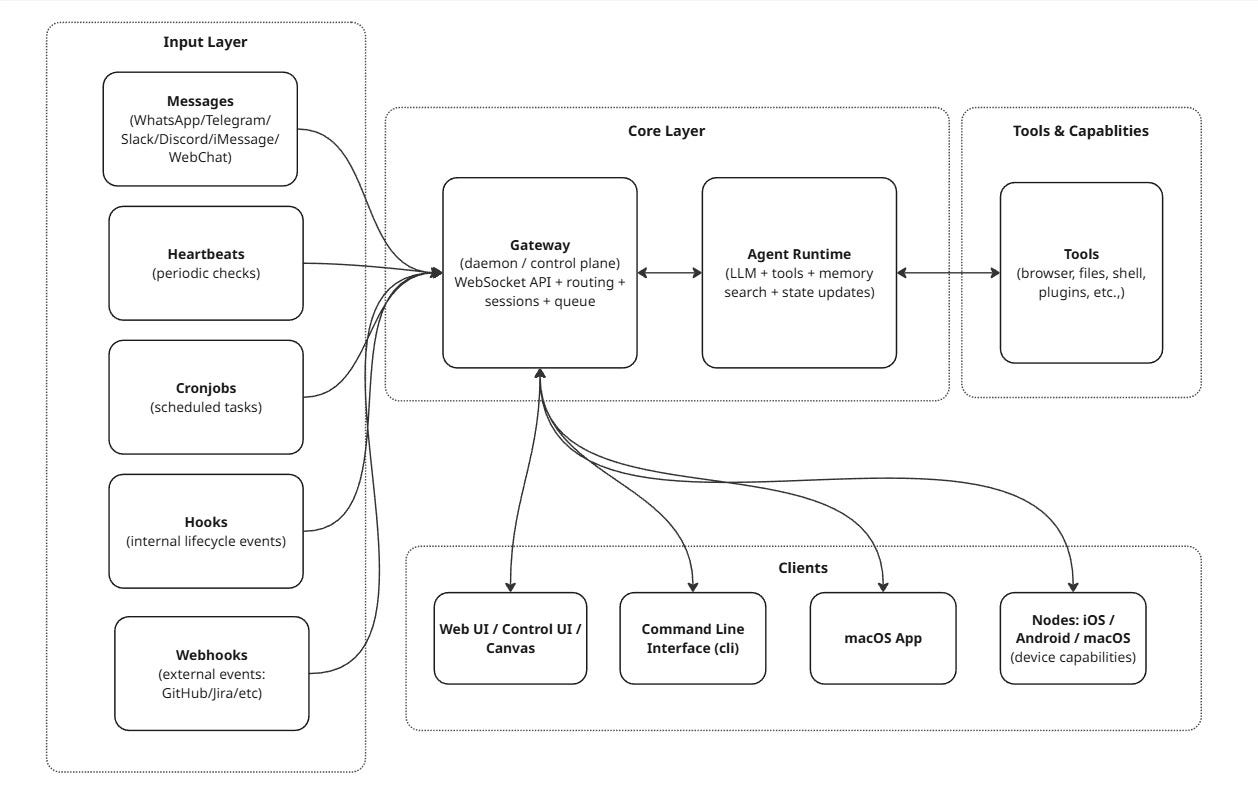
OpenClaw is essentially an event-driven, session-isolated, single-writer state machine built around a centralized control plane.
Key idea: the Gateway is the traffic controller and source of truth. The agent runtime is the worker that does the “thinking + doing.”
3) The Gateway: the central router (and source of truth)
OpenClaw runs a Gateway daemon that stays up, keeps connections alive, and coordinates the entire system. The docs are explicit:
All session state is owned by the Gateway
UI clients should query the Gateway rather than reading local session files directly
3.1 Sessions: isolation is deliberate (and configurable)
When you talk to OpenClaw from different places (DM vs group chat, Telegram vs Slack, etc.), you don’t want accidental context leaks. OpenClaw models this as session keys.
The session model is flexible, but the default concept is:
One primary DM-like session per agent (often called
main)Separate sessions for groups/channels/threads
Optional “secure DM mode” that isolates DMs per sender/channel/account to avoid leaking context between people
A simple mental model:
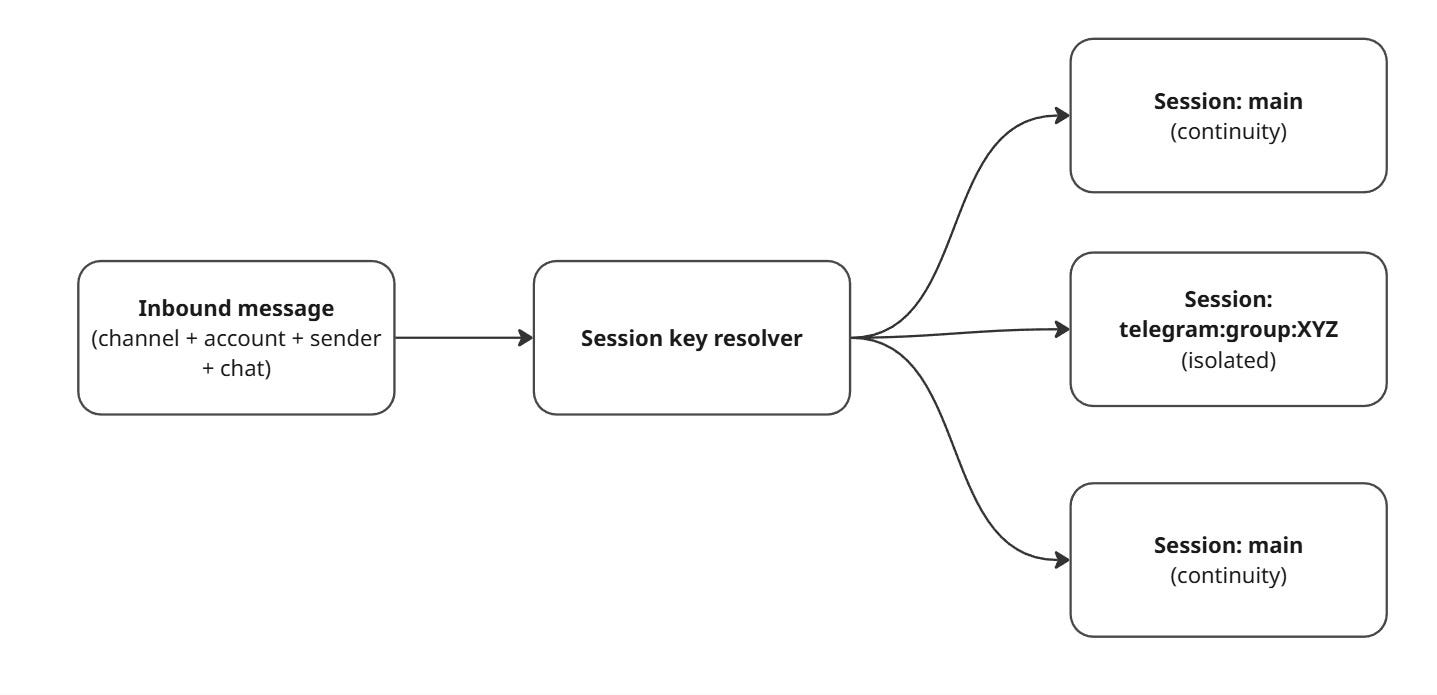
If you’re running OpenClaw for more than just yourself, secure DM mode matters because the default DM scope can share the same session context across DMs for continuity unless configured otherwise.
3.2 Where session state actually lives
OpenClaw stores session transcripts on disk as JSONL and keeps a store file that maps session keys to session ids and metadata. The docs show paths like:
Store:
~/.openclaw/agents/<agentId>/sessions/sessions.jsonTranscripts:
~/.openclaw/agents/<agentId>/sessions/<SessionId>.jsonl
This matters for two reasons:
Durability: sessions survive restarts
Security: those files can contain sensitive content
4) The queue: how OpenClaw prevents “two thoughts at once” collisions
If multiple inputs arrive close together (a Slack DM + a heartbeat + a webhook), you do not want concurrent runs trampling the same session files or tool state.
OpenClaw addresses this with a lane-aware FIFO queue:
It guarantees only one active run per session
It can still allow parallelism across different sessions, up to configured caps
Here’s a simplified version of how that queue works:
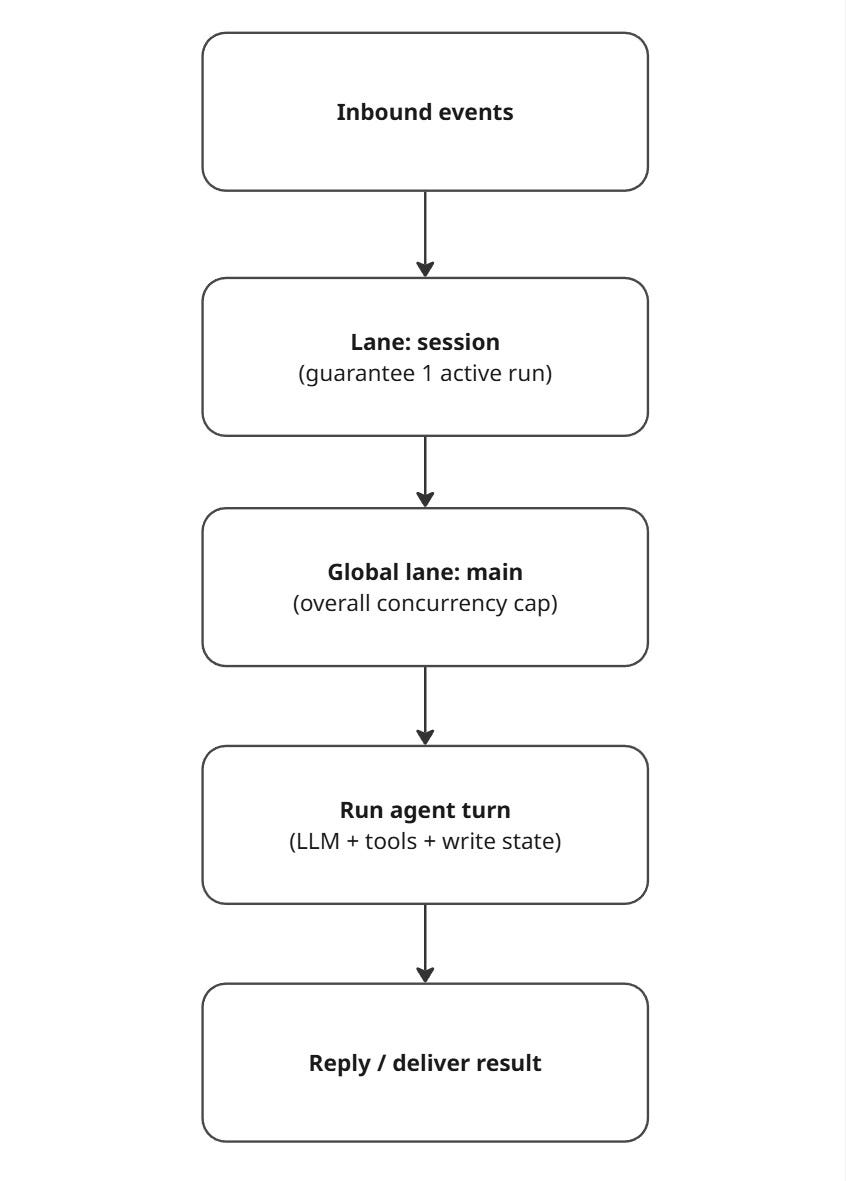
OpenClaw also supports different queue behaviors (“modes”) such as:
collect (default): coalesce multiple messages into one follow-up turn
followup: always wait until the current run ends
steer: inject into the current run (at tool boundaries)
So the “sequential state machine” feeling is real per session, but the system can still run other sessions concurrently depending on configuration.
5) The protocol: everything speaks the same typed WebSocket language
A big reason OpenClaw can support many surfaces (CLI, web UI, desktop app, mobile nodes) is that it treats the Gateway as a proper control plane.
5.1 Three frame types: req / res / event
OpenClaw defines a simple WebSocket message model:
Request:
{ type: "req", id, method, params }Response:
{ type: "res", id, ok, payload | error }Event:
{ type: "event", event, payload, ... }
And the first frame must be a connect request.
5.2 TypeBox: schemas drive validation and codegen
OpenClaw uses TypeBox schemas as the source of truth for its protocol. That allows:
Runtime validation (reject bad frames)
JSON schema export
Model/code generation for clients
Here’s the simplest “hello world” connection flow:
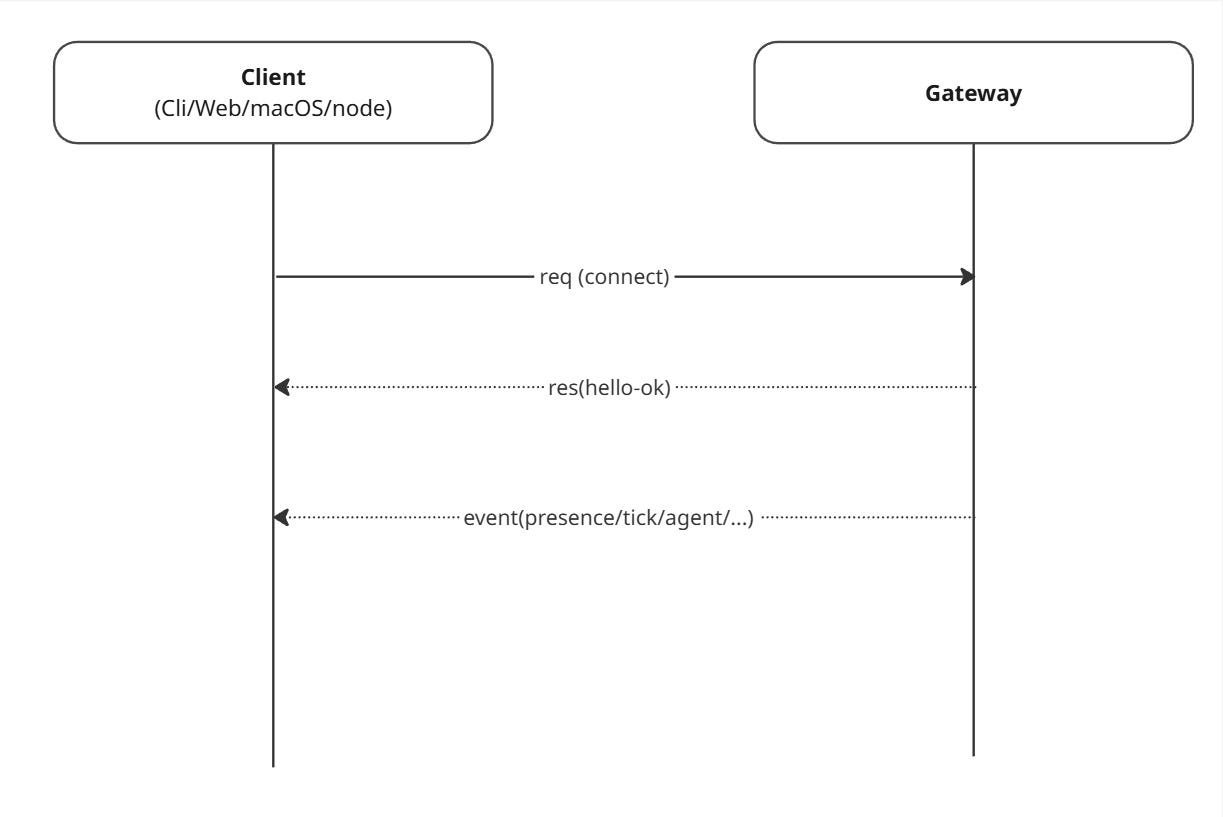
The docs also call out protocol versioning and auth at connect time, including token-based auth if you set a Gateway token.
6) The agent runtime loop: where “chat” turns into “work”
Once the Gateway decides which agent and which session should handle an input, the agent runtime does a normal loop:
Load context (session history + workspace context)
Call the model
Execute tool calls (browser, filesystem, shell, nodes, plugins)
Persist updates
Respond (or intentionally stay silent)
A compact loop diagram:
6.1 “Memory” isn’t learning - it’s files
This is one of the most important mental shifts:
OpenClaw doesn’t “learn” by changing model weights.
It maintains continuity by reading and writing state on disk and re-injecting it into context during turns.
OpenClaw’s “Agent Workspace” doc describes the workspace as the agent’s home and a place you should treat as memory.
Also worth noting: the workspace is the default working directory, not a hard sandbox, relative paths resolve inside the workspace, but absolute paths can reach elsewhere unless you enable sandboxing.
7) The five input types that create the “autonomy” illusion
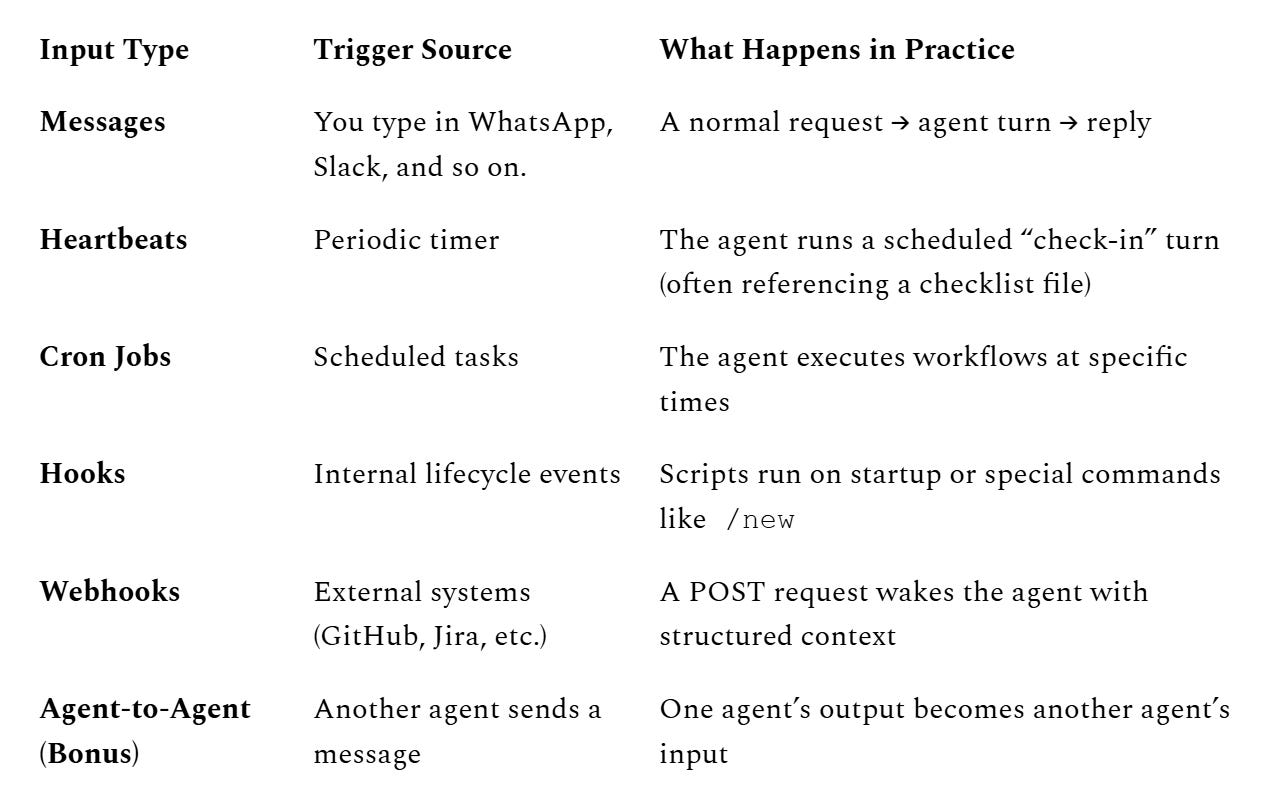
Most chatbots only wake up when you type. OpenClaw wakes up on multiple trigger types, and that’s why it can feel “alive.”
Here are the five core input vectors (plus a bonus):
A few surprisingly important specifics:
Heartbeats default to 30 minutes (with an exception for some auth modes), and the recommended pattern is: if nothing needs attention, respond with
HEARTBEAT_OK.Webhooks can be configured to trigger a turn immediately or wait until the next heartbeat, and delivery can be enabled/disabled.
Hooks are an event-driven automation system discovered from multiple directories (workspace, managed, bundled).
8) The “3:00 AM phone call” example: it’s just the pipeline
Let’s demystify the classic spooky moment:
“Why did my assistant decide to do something while I was sleeping?”
No emergence required. Just:
time created an event
the Gateway queued it
the agent ran a turn
a tool executed the action
9) Security: powerful agents are “spicy” by design
OpenClaw’s own security docs basically say what everyone is thinking: running an agent with shell/file access is risky, and there is no perfectly secure setup, your goal is to be deliberate about who can talk to it, where it can act, and what it can touch.
9.1 Why the attack surface is big
OpenClaw can:
receive untrusted text from many channels
read files, browse the web, run tools
install/execute “skills” or extensions
That combination makes classic agent risks very real:
Prompt injection (direct or indirect, via web pages/docs/emails)
Skill supply-chain risk (a “helpful” skill is actually malware)
Credential exposure (tokens, API keys, cookies)
Command misfires (a model trying to be helpful with destructive shell commands)
Cisco’s AI Threat & Security Research team highlighted how risky “skills” can be, and cited research that 26% of 31,000 analyzed agent skills contained at least one vulnerability, launching an open-source scanning tool in response.
9.2 Built-in mitigations you should actually use
A practical hardening checklist:
Pairing + DM policies
Pairing codes expire after one hour, and pending requests are capped, so unknown users can’t just DM your agent and get full access.Gateway token for non-local access
If you expose the Gateway beyond localhost, require a token so connections must authenticate at handshake.Secure DM mode when multiple people can DM you
Isolate per sender/channel to avoid context leakage.Sandboxing / least privilege
Remember: the workspace is not a sandbox by default. Enable sandboxing if you’re letting the agent run code or touch sensitive paths.Audit your setup
The docs recommend runningopenclaw security auditto spot dangerous settings and exposures.Treat community skills as untrusted code
Scan, review, pin versions, and avoid “random skill of the day” behavior.
9.3 Deployment advice (simple and realistic)
If you want the benefits without the nightmares:
Run OpenClaw on a dedicated machine or VM (so “agent got owned” doesn’t mean “your whole laptop is owned”).
Use separate accounts / scoped tokens for email, Slack, GitHub, etc.
Start with “read-only” workflows (summaries, drafts) before letting it execute actions.
10) A quick “where to look in the code/docs” map
If you want to go deeper, these are the most architecture-relevant entry points:
Session management (dmScope, secure DM mode, file locations)
Command queue (lane-aware FIFO, per-session guarantee, modes)
Final takeaway: OpenClaw’s “autonomy” is an engineering pattern
If you distill everything down, OpenClaw’s architecture is basically four pieces:
Time (heartbeats + cron)
Events (messages + hooks + webhooks)
State (sessions + workspace memory on disk)
Loop (agent turns: read → decide → act → write)
When people ask whether agents are “alive,” they’re asking the wrong question.
The real question is:
- What events wake them?
- What state do they own?
- What invariants do they enforce?
- What tools can they execute?
OpenClaw answers those questions with a clear architecture.
And that clarity is what makes it powerful.
Thanks, this is super useful stuff! And I finally get what the OpenClaw hype is all about!
Though I find it funny that people jump to anthropomorphise it, when it's just a heartbeat , and a bunch of other triggers that makes it do stuff!
The 'lane-aware FIFO queue with one active run per session' detail is what I've been missing. I've been hitting concurrency issues in my own setup - multiple triggers, unclear which session owns the current state.
The JSONL transcript approach for state persistence makes sense. Disk-based durability beats keeping everything in memory when agents restart unexpectedly (which they do, often, for reasons you won't predict in advance).
One thing I'm curious about: how does the Gateway handle priority? If a higher-priority event comes in while a session is mid-run, does it queue and wait, or is there preemption? The docs I've seen are silent on this.