
The Agent Stack - Part 6: Tools, MCP, and Capability Surfaces
Why a tool is not just a function call

“Send the customer the updated contract.”
That looks like one tool call.
It is not.
Before the system sends anything, it has to decide which tool is visible, which account is acting, which file is in scope, whether the recipient is allowed, whether this should create a draft or send immediately, whether approval is required, and what evidence gets left behind.
That is why tools are not just function calls.
They are capability surfaces.
The model asks. The system acts.
Most tool-calling examples start with the loop.
The runtime gives the model a list of tools. The model decides one is useful. It returns a structured call. Some code executes. The result comes back. The model continues.
That loop is real.
It is also too small to explain the system.
OpenAI describes tool calling as a multi-step conversation: make a request with tools, receive a tool call, execute application-side code, send tool output back, then receive a final response or more tool calls. It also distinguishes a function as a specific kind of tool, defined by JSON schema, where the model can pass data to application code that may access data or take actions suggested by the model.
That distinction is the seam.
The model can request.
The system decides whether and how to act.

Once you see that seam, “tool calling” stops being the interesting phrase.
The interesting part is everything between request and action.
What tool was exposed?
What identity does it use?
What scope does it have?
What context does it receive?
Does the user need to approve this?
Where does execution happen?
What does the result mean?
That is the capability layer.
The capability surface is the tool layer.
A capability surface is the set of actions and context sources the runtime exposes to the model as possible next moves.
That surface includes the tool name, description, schema, result format, and sometimes annotations about behavior. It also includes the decision to expose this tool to this model, in this run, for this user, at this point in the workflow.
That last part matters.
A tool is not risky only because of what it does. It is risky because of when it is visible, which identity it uses, and how much authority sits behind it.
Take send_email.
That name can hide several different capabilities:
create a draft
send immediately
send only to an existing customer contact
send to any address
attach files
attach only files from the current case
send as the user
send as a shared mailbox
send as a service account
Those are not small differences.
They are different authority shapes.
A schema validates shape. It does not grant authority.
A better tool surface might expose create_customer_reply_draft instead of send_email.
It might expose search_contracts_for_customer instead of read_drive_file.
It might expose schedule_meeting_with_known_contacts instead of calendar_api_call.
This is not just naming hygiene. It is blast-radius control.
OWASP’s guidance on excessive agency maps directly to this layer. It identifies excessive functionality, excessive permissions, and excessive autonomy as common root causes. The examples include tools with unnecessary delete operations, downstream identities with more permissions than needed, and high-impact actions performed without confirmation.
That is boundary design.
Expose fewer tools.
Make them narrower.
Bind them to the right identity.
Require approval where the action is hard to reverse.
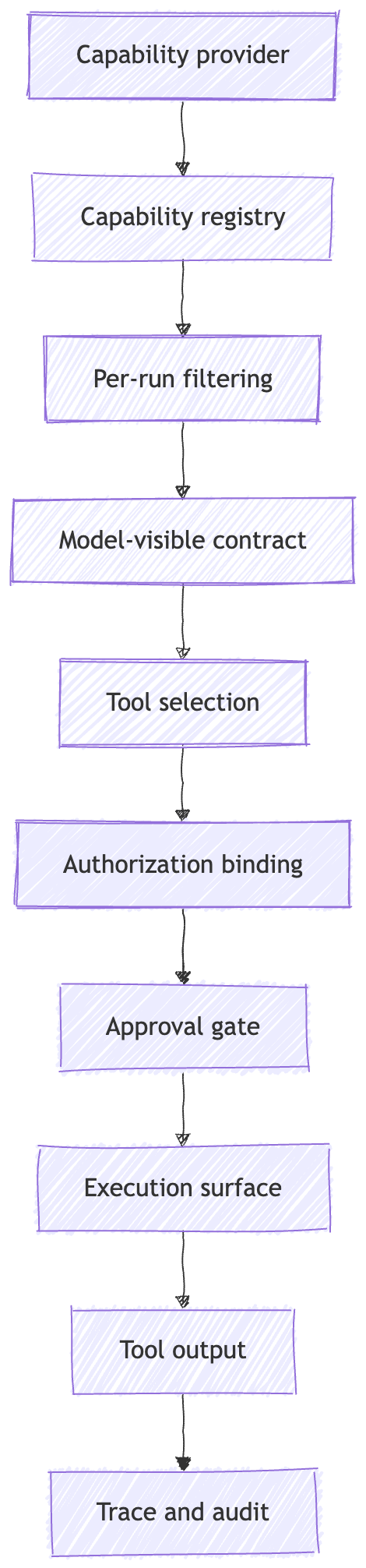
The model should not get every capability the application knows how to perform.
It should get the subset that is relevant, scoped, and safe to request in this run.
MCP standardizes capability exchange.
This is where MCP fits.
MCP gives part of this capability surface a protocol.
The Model Context Protocol defines a JSON-RPC based protocol that lets applications share context, expose tools and capabilities, and build composable integrations. It uses a host, client, server model: hosts are LLM applications, clients are connectors inside the host, and servers provide context and capabilities.
MCP is not just “functions over JSON-RPC.”
It separates several primitives:
Resources, context and data for the user or model
Prompts, templated messages and workflows
Tools, functions for the model to execute
Roots, filesystem or URI boundaries exposed by clients
Sampling, server-initiated model interactions through the client
Elicitation, server-initiated requests for more user information
The point of listing them is not taxonomy.
The point is that MCP separates different kinds of capability and context instead of treating everything as one tool bucket.
A resource is not a tool.
A prompt is not a policy.
A root is not a full permission system.
A sampling request is not a server-owned model key.
MCP gives these concepts protocol shape. It does not collapse them into one bucket.
My read is that MCP belongs at the capability boundary.
It standardizes how capabilities and context are exposed across hosts, clients, and servers. It does not replace the runtime. It does not replace authorization. It does not replace approval. It does not decide which execution surface should be trusted.
The MCP architecture places significant responsibility in the host: creating and managing clients, controlling connection permissions, enforcing security policies and consent requirements, handling user authorization decisions, coordinating model integration, and aggregating context across clients.
So the useful sentence is not:
MCP solves tools.
The useful sentence is:
MCP standardizes capability exchange. It does not decide what should be trusted.
Transport changes the boundary too.
A stdio MCP server is launched as a subprocess. A Streamable HTTP MCP server runs as an independent HTTP server. The MCP transport spec calls out different security requirements for HTTP, including validating Origin, binding local servers to localhost, and implementing authentication.
Same protocol family.
Different operating boundary.
Schema is not permission.
Tool schemas are useful.
They tell the model how to ask for something. They constrain argument shape. They help the runtime parse the request. They make the capability legible.
They do not grant authority.
A schema can say:
{
  "recipient": "customer@example.com",
  "subject": "Updated contract",
  "attachment_id": "file_123"
}
It cannot answer the questions that matter operationally:
Is this recipient allowed?
Is this file in scope for this customer?
Is the user allowed to send from this mailbox?
Is this an internal-only document?
Is the action reversible?
Does it need approval?
Those questions live outside the schema.
They belong to authorization, policy, approval, and downstream enforcement.
Authorization answers: who is allowed to do what, against which resource, under which scope?
Approval answers: should this specific action happen now?
Execution answers: where does the action actually run?
The schema answers: what shape should the request have?
Do not collapse those.
MCP’s authorization spec reinforces the separation. It provides authorization capabilities at the transport level for HTTP-based transports, but authorization is optional for MCP implementations. The spec also says stdio implementations should not follow the HTTP authorization flow and should retrieve credentials from the environment instead.
That means even inside one protocol family, the auth story changes with transport.
A local stdio server, a remote HTTP server, a hosted tool, and a connector-backed action all have different authority shapes.
The architecture has to make those differences visible.
The model proposes.
Policy checks.
Approval may intervene.
Execution happens only after the boundary allows it.
Tool output is context, not truth.
Tool output often looks more authoritative than normal model text.
It came from a database. Or a web page. Or a file search. Or a remote MCP server. Or a browser. Or a code executor.
So the system treats it like grounding.
That can be useful.
It can also be wrong.
A tool result is an observation. It enters the runtime and often gets injected back into the model’s context. OpenAI defines tool call output as the response generated from the model’s tool call and describes sending that output back to the model before the final response or further tool calls.
Tool output is context with provenance, not truth by default.
That means the result may be fresh or stale. First-party or third-party. User-authored or system-authored. Scoped or overbroad. Validated or raw. Clean data or attacker-controlled instructions.
The MCP tool spec also reflects this complexity. Tool results may contain structured or unstructured content, including text, images, audio, resource links, embedded resources, and structured content. Tools may also define output schemas, and clients should validate structured results against those schemas when provided.
Validation helps.
It is not the same as trust.
OWASP describes indirect prompt injection as occurring when an LLM accepts input from external sources such as websites or files, where that external content can alter model behavior in unintended ways.
So the rule is simple:
Do not let untrusted tool output silently become instruction.
A search result should be treated differently from a first-party database row.
A webpage should be treated differently from a signed internal record.
A tool response from a trusted internal MCP server should be treated differently from text returned by an unknown remote server.
This is where provenance stops being academic.
The runtime needs to know what came back, where it came from, how old it is, whether it was validated, and whether the model should treat it as evidence, context, or untrusted external content.
Same label, different operating boundary.
A lot of things now show up as “tools.”
They do not fail the same way.
A hosted tool can run near the model on provider-managed infrastructure. The OpenAI Agents SDK, for example, distinguishes hosted OpenAI tools, local runtime execution tools, function tools, agents-as-tools, and other tool categories. Hosted tools run on OpenAI servers, while local/runtime tools run in your environment.
A code interpreter tool is different. OpenAI’s Code Interpreter uses a container, described as a fully sandboxed virtual machine that the model can run Python code in.
Computer use is different again.
A computer-use tool needs an environment that can capture screenshots and run returned actions. OpenAI’s computer-use docs recommend using an isolated environment where possible and deciding in advance which sites, accounts, and actions the agent is allowed to reach.
Those examples all expose capabilities.
But the operating responsibilities differ:
Hosted tools shift more execution responsibility to the provider.
Local tools put execution, credentials, retries, and isolation in your application.
Connectors bind tool access to external services and user or tenant auth.
MCP servers standardize exposure, but trust depends on server, transport, auth, and host policy.
Computer-use tools cross into browser or UI execution, where the environment itself becomes part of the risk surface.
Calling all of these “tools” is fine for a product UI.
It is not enough for architecture.
For architecture, the better question is:
Where does authority actually flow?
This is the Part 6 to Part 7 handoff.
This post is about the capability surface: what the model can request.
The next layer is execution: where the request becomes real.
Failure modes
Schema treated as permission
The tool has a clean JSON schema, so everyone relaxes.
That is the wrong layer.
A schema validates shape. It does not enforce tenant isolation, downstream authorization, document scope, or approval policy.
MCP treated as a security boundary
MCP gives you protocol structure.
It does not automatically give you trusted servers, safe metadata, correct OAuth, scoped credentials, approval UX, or sandboxed execution.
MCP’s own specification treats tools as powerful, model-controlled capabilities and warns that tool behavior metadata should not be trusted unless it comes from a trusted server.
Tool output treated as truth
A result comes back from a tool, gets appended to context, and the model treats it as grounding.
That result may contain stale data, incomplete data, attacker-authored content, or instructions pretending to be data.
Tool metadata treated as trusted instruction
Tool names, descriptions, annotations, and returned resource links are inputs to the system.
If they come from an untrusted source, they deserve scrutiny.
The MCP tool spec says a tool definition includes a name, description, input schema, optional output schema, annotations, and execution-related properties. It also states that clients must consider tool annotations untrusted unless they come from trusted servers.
Connector consent treated as action approval
A connected account gives the system an access envelope.
It does not mean every action inside that envelope should happen without review.
The user may have connected email so the agent can summarize messages. That does not mean the agent should be able to send messages without a separate approval path.
Open-ended tools exposed too early
A shell command tool, arbitrary URL fetcher, or unrestricted browser action gives the model a large action space.
OWASP explicitly calls out open-ended extensions as a risk pattern and recommends avoiding them where possible in favor of more granular functionality.
Approval hidden inside implementation details
Approval should be visible in the run lifecycle.
If approval is buried inside a tool implementation, you lose the ability to reason about what paused, what was approved, what changed, and what should be audited.
Builder checklist
If you are building this layer, I would check these first:
Filter tools per run.
Expose only the tools needed for this user, tenant, workflow stage, and task.Keep tools narrow.
Prefer intention-revealing tools over open-ended tools.create_reply_draftis safer thansend_email.search_customer_contractsis safer thanread_any_drive_file.Separate schema from authority.
Use schemas for shape. Use policy and downstream authorization for permission.Bind identity explicitly.
Know whether the tool runs as the user, a service account, a connector identity, a local process, or provider infrastructure.Separate connector scope from action approval.
OAuth gives an access envelope. Sensitive actions may still need approval at the point of risk.Treat tool output as untrusted context until validated.
Track source, freshness, scope, and whether the content came from an external or attacker-controlled surface.Trace the whole path.
Record what was exposed, what the model selected, what arguments it produced, what policy decided, what was approved, what executed, and what result came back.Design the next boundary now.
Once a capability can change the world, execution surface, identity, and approval boundaries become first-class architecture.
Recap
Tools are not just function calls.
A tool is the contract the model can see. The capability surface is the boundary that decides which contracts are exposed.
That surface matters because the model does not act in a vacuum. It asks through schemas, tools, resources, prompts, connectors, MCP servers, hosted tools, local functions, browser harnesses, code sandboxes, and downstream APIs.
MCP matters because it standardizes capability exchange. It gives hosts, clients, and servers a common way to expose tools, resources, prompts, and context.
But MCP is not the whole runtime. It is not authorization by itself. It is not approval. It is not the execution surface. It is not a trust engine.
The production question is what happens between:
the model requested a capability
and:
the world changed.
That gap is where most of the engineering lives.
What comes next
Part 7 goes one layer deeper: execution surfaces, identity, and approval boundaries.
That is where the request becomes real. The system touches a browser, API, database, code runner, filesystem, device, or worker. It has to decide whose identity is acting, what scope applies, what needs approval, and what must never happen silently.
If this part helped clarify the tool layer, Part 7 will cover the boundary where tools start touching real execution surfaces.
The Agent Stack v1
New here? Start with Part 1 for the full stack map. Subscribe if you want the rest of the series as it publishes.